Understanding SSL Certificates for Website Security: A Guide for Small Businesses
An SSL certificate is a digital credential that encrypts traffic between a visitor’s browser and your website, keeping customer data private and letting browsers show HTTPS trust indicators.
For small businesses, missing or weak encryption can mean exposed information, fewer leads, and worse visibility in search. Knowing the basics of SSL is a practical, high-value step.
This guide covers what SSL/TLS certificates do, how site encryption protects customers, which certificate types suit common small-business setups, and the real benefits HTTPS brings for security, conversions, and local SEO.
You’ll also get straightforward certificate recommendations, realistic cost ranges, renewal and maintenance best practices, and answers to common owner questions. Each section includes actionable lists and comparison tables so contractors, home builders, and service pros can make clear, confident choices.
Read on to learn how to lock down customer data, improve trust signals like the browser padlock, and fold managed SSL into a web care workflow.
What Is an SSL Certificate and How Does It Protect Your Website?
An SSL certificate (typically using TLS) is a cryptographic credential issued by a Certificate Authority (CA). It turns your site into HTTPS by enabling encrypted connections and by proving your site’s identity.
Under the hood, this uses a public/private key pair and a handshake that creates a secure session key. This ensures form entries, logins, and payments travel unreadable to eavesdroppers.
That stops interception and tampering, reducing the chance of credential theft or man-in-the-middle attacks—the kinds of issues that can cost leads and reputation. Knowing these basics helps you pick the right certificate and set up renewal and monitoring so your site stays online and trusted.
You don’t have to do this alone. A web partner can handle SSL setup as part of a secure site build or ongoing maintenance, removing the technical burden so you can run the business.
At Pixel Drip Studio, we include SSL implementation in our mobile-friendly site builds and web care plans. This means encryption is active at launch and monitored after.
That lets you focus on operations while we manage certificate issuance, server configuration, and any mixed-content fixes. Below we explain encryption in plain terms so you can share it with staff or clients.
How Does SSL Encryption Secure Data Transmission?
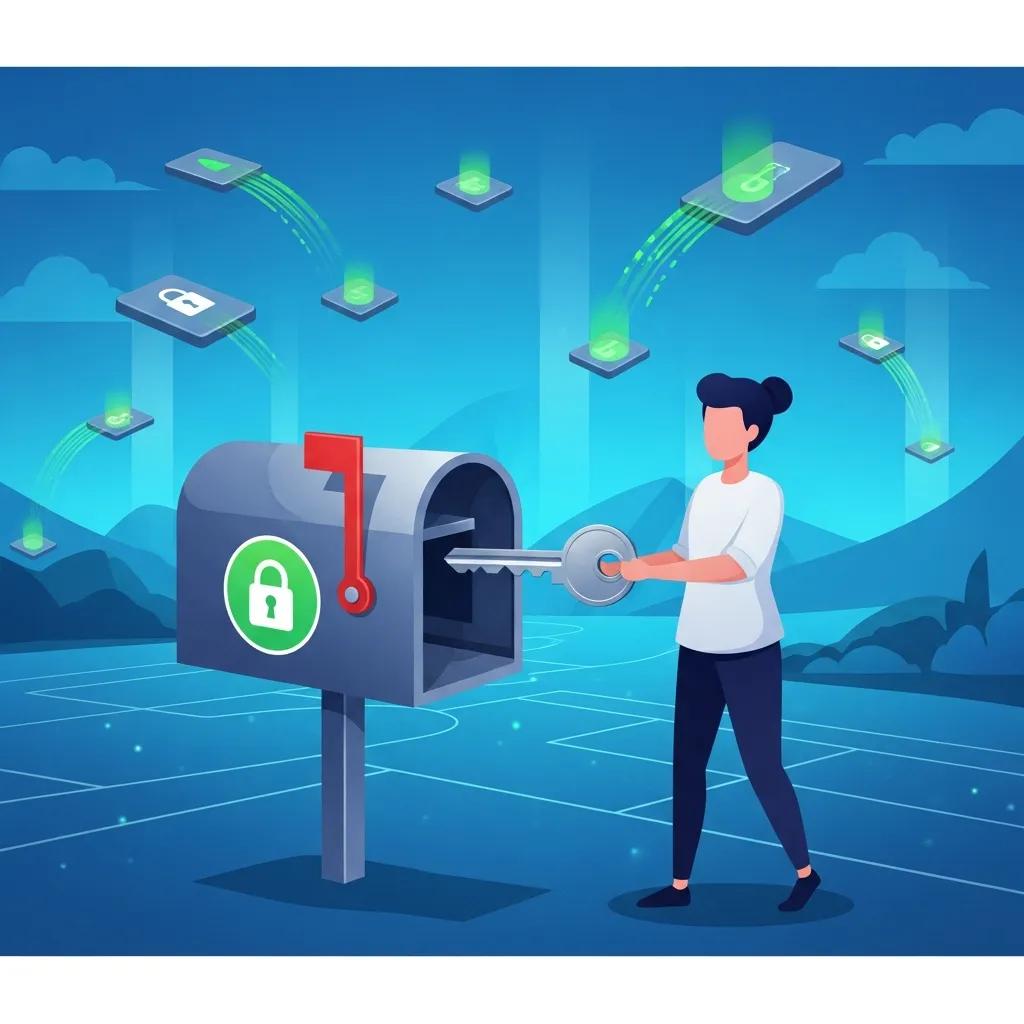
SSL/TLS uses asymmetric cryptography: a public key to lock data and a private key to unlock it, plus a handshake that creates a fast, temporary session key for symmetric encryption.
A plain analogy: the public key is a locked mailbox anyone can drop a note into; the private key is the one key that opens it so only the intended recipient can read the message.
The TLS handshake also ties your site’s certificate to a trusted CA through a certificate chain that browsers check, which prevents impostor sites from pretending to be your business.
Together these steps keep contact forms, payment fields, and login data secure, vital for protecting customers and preserving your reputation.
Explaining the handshake and key exchange in plain language helps non-technical stakeholders understand why renewals and monitoring matter. Next, we’ll look at how HTTPS shows up for visitors and why that matters for conversions.
What Role Does HTTPS Play in Website Security?
HTTPS is the visible sign that a valid SSL/TLS certificate is in place. Browsers show trust signals like a padlock, a “Secure” label, and the absence of mixed-content warnings.
Those signals reassure visitors that their data is encrypted and that the site has been verified, which improves confidence on contact and payment pages.
Mixed content, when some assets still load over HTTP, can trigger warnings that hurt credibility. A full HTTPS migration means updating images, scripts, and third-party assets to secure endpoints.
Search platforms treat secure contexts as the norm, so HTTPS is a basic expectation for modern sites. Below are the core benefits that make SSL/TLS essential:
- End-to-end encryption of data in transit, preventing interception.
- Authentication of site identity so visitors can trust they’re on your official site.
- Browser trust signals that increase user confidence and conversions.
These benefits lead into choosing the right certificate type for your needs.
Which Types of SSL Certificates Are Best for Small Businesses?
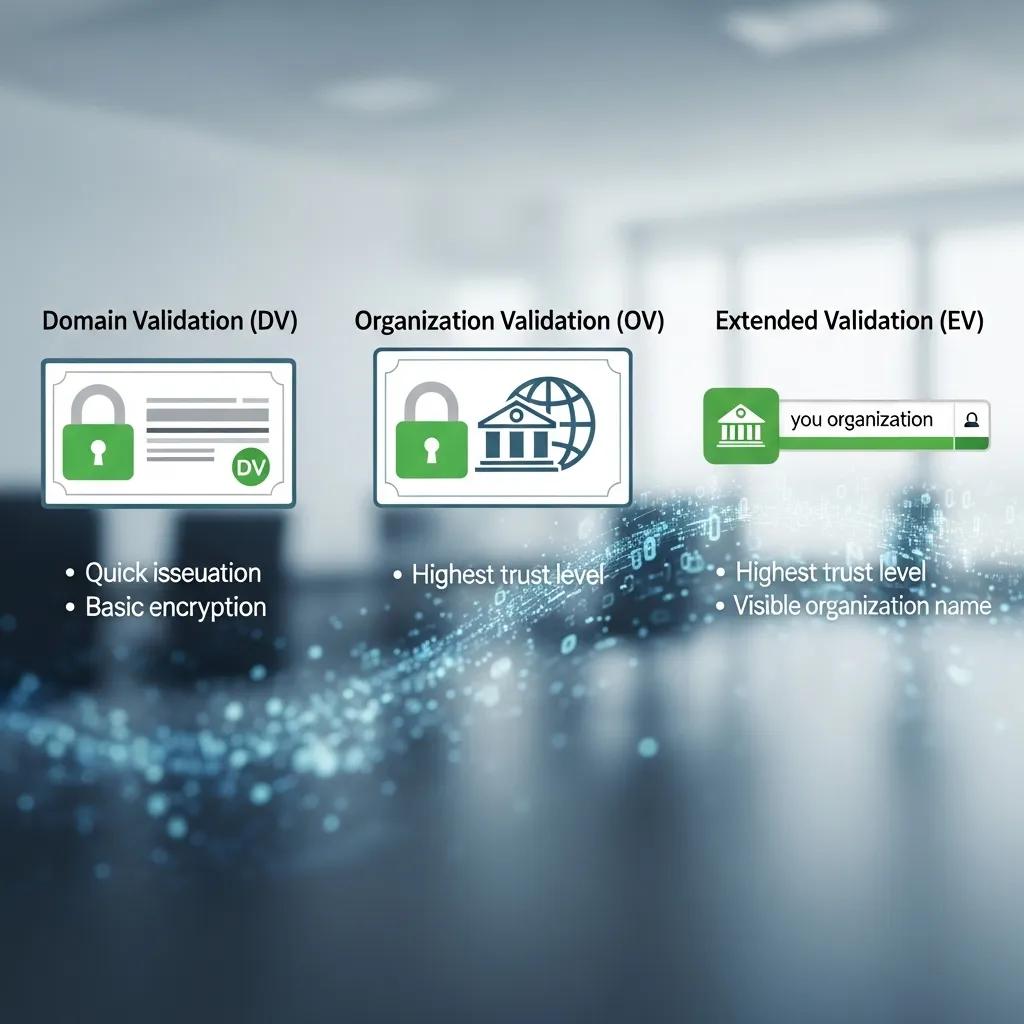
Picking the right SSL depends on validation level, how many domains or subdomains you need to cover, and your budget. Common options include Domain Validation (DV), Organization Validation (OV), Extended Validation (EV), Wildcard, and Multi-Domain/SAN certificates.
DV proves domain control quickly and works well for single-site brochure sites. OV adds business verification for stronger trust. EV involves the most rigorous checks (though browser UI for EV has changed over time) and suits high-trust commerce.
Wildcard certs protect a domain and all its subdomains, which reduces management when you run many subdomains. SAN/multi-domain certificates secure several different hostnames under one certificate, handy if you host multiple services together.
Match coverage and validation to whether you take payments, collect personal data, or run several subdomains.
Use this compact comparison to map certificate types to small-business needs.
This table illustrates how validation level, coverage, and issuance time affect your choice. The next section defines DV, OV, and EV in plain terms so you can weigh trade-offs.
What Are Domain Validation, Organization Validation, and Extended Validation Certificates?
Domain Validation (DV) certificates simply confirm control of a domain; they’re fast and inexpensive, good for informational sites.
Organization Validation (OV) adds checks of registered business details and gives visitors more assurance that your site is run by a real company.
Extended Validation (EV) requires stricter identity verification; while browser displays for EV have shifted, EV still signals the highest level of vetting to security-minded audiences.
Choose DV if speed and cost matter most, OV if visible business verification matters, and EV only when you need the strictest identity checks for compliance or enterprise trust.
With those definitions in hand, you can apply a simple decision framework to real small-business scenarios.
How to Choose the Right SSL Certificate for Your Texas Business?
Start by checking three things: the sensitivity of the data you handle, how many domains/subdomains need coverage, and your budget for purchase and management.
A solo contractor with a single site and contact form will usually be fine with a DV or free automated certificate. A home builder taking deposits or handling contracts should consider OV for added organizational assurance.
If you run multiple subdomains, for example jobsite.example.com and portal.example.com, look at Wildcard or SAN certificates to simplify renewals and reduce admin work.
A quick checklist: list your domains, note the types of data you collect, and decide whether visible organization verification matters to your customers; those answers will guide procurement and renewal strategy.
Here are short, practical recommendations for common setups:
- Solo informational site: DV: low cost, fast setup.
- Payment or contracts: OV: signals verified business identity.
- Multiple subdomains: Wildcard or SAN: simplifies management.
Those recommendations set you up to compare costs and maintenance options next.
What Are the Key Benefits of HTTPS and SSL for Small Business Websites?
HTTPS and SSL deliver measurable benefits: they protect customer data, surface trust signals that lift conversions, and support local SEO through better engagement metrics.
Secure connections prevent credential theft and tampering while allowing forms and payments to work without warning messages, which reduces abandonment on contact and checkout pages.
Trust indicators like the padlock make your business look more professional to homeowners comparing contractors. Even modest SEO gains from HTTPS can compound over time through higher click-through rates and lower bounce.
Together, these effects lower risk, improve lead quality, and make your digital marketing work harder.
Three primary business-focused benefits to keep top of mind:
- Security: Encrypts data in transit to prevent eavesdropping and tampering.
- Trust & Credibility: Browser indicators reduce hesitation and increase form completions.
- SEO & Engagement: Supports ranking signals and improves user behavior metrics.
Below is a quick mapping of benefits to business outcomes for fast decision-making.
Seeing benefits mapped to outcomes shows why an SSL-first approach supports marketing goals. Next we’ll explain how those trust signals affect customer decisions.
How Does SSL Build Customer Trust and Credibility?
SSL creates both visible and behavioral trust cues: the padlock icon, the HTTPS prefix, and a lack of security warnings tell visitors your site is professional and safe.
Those cues lower friction at checkout and when filling contact forms because people feel confident their info is handled securely, which boosts micro-conversion rates for quote requests and form fills.
For local service buyers, perceived legitimacy matters; a secure site can be the difference between a phone call and a bounce. When you pair SSL with clear contact info and social proof, the overall trust toolkit becomes stronger and conversion improvements are more consistent.
In What Ways Does HTTPS Improve Local SEO and Google Rankings?
HTTPS is a lightweight ranking signal in Google’s algorithm and also helps SEO indirectly by improving user metrics like click-through rate, time on site, and bounce rate.
Secure pages tend to be indexed and treated as more trustworthy, and users are likelier to engage with listings that lead to secure sites, which benefits local search performance.
For local businesses, better engagement can strengthen signals to the local pack and map results, driving more qualified nearby leads. Implement HTTPS as part of a holistic local SEO plan, with optimized content, accurate citations, and mobile-first design, to get the best results.
With benefits and SEO impact covered, the next section explains how Pixel Drip Studio folds SSL into web design and SEO services for small businesses.
How Does Pixel Drip Studio Integrate SSL Certificates into Web Design and SEO Services?
At Pixel Drip Studio we build SSL into site launches, migrations, and ongoing web care so HTTPS is active from day one and kept current.
Our work includes installing certificates correctly on hosting, fixing mixed-content during migration, and setting redirects so SEO equity transfers cleanly to HTTPS.
We follow a done-for-you model for small business owners: we handle technical setup, validation, and monitoring as part of our web design and care plans to reduce owner workload and avoid accidental lapses.
Ongoing SEO then leverages the secure state by updating internal links, resubmitting sitemaps, and tracking performance metrics that reflect improved trust and conversions.
The paragraph below outlines the managed-SSL benefits included in web care plans and prepares for a closer look at lead-generation impact.
What Are the Advantages of Including SSL in Web Care Plans?
Including SSL in a managed web care plan saves time and cuts risk by automating renewal monitoring, applying updates, and fixing mixed-content issues when they appear.
Automated alerts and scheduled renewals prevent the kind of expiration that causes browsers to flag sites as insecure, an issue that quickly harms leads and rankings.
Managed plans also handle certificate reinstallation after hosting changes and resolve security warnings that might scare off customers. Those operational benefits deliver stable uptime and keep trust signals intact, which makes your business more resilient and marketing-ready.
A managed SSL strategy directly supports lead generation by keeping landing pages secure and conversion-ready, as described next.
How Does SSL Support Lead Generation and Visitor Conversion?
SSL supports lead generation by preserving trust across paid ads, organic listings, and direct visits so landing pages convert better and ad quality scores stay healthy.
Secure landing pages remove friction for form completions and increase confidence when customers are asked for contact details or payment info, a critical factor for service industries like contracting.
Consistent secure experiences also reduce bounce, improve campaign ROI, and send positive signals back into local search rankings. Paired with focused landing-page design and local SEO, SSL becomes a technical enabler of measurable lead improvements.
The next section lays out realistic costs and practical maintenance steps to keep certificates valid.
What Are the Costs and Maintenance Best Practices for SSL Certificates?
SSL costs span free automated options to paid certificates that include warranties, support, and broader coverage. Maintenance best practices center on automation, monitoring, and post-installation testing.
Free options (like Let’s Encrypt) give strong encryption at no cost but usually don’t include commercial warranties or vendor support.
Paid certificates range from modest annual fees for DV/OV up to higher costs for EV, Wildcard, and Multi-Domain certificates and often include support and issuance guarantees.
A practical maintenance checklist: automate renewals where possible, set reminders well before expiry, test certificate chains and mixed content after installation, and monitor error logs. Following those steps avoids surprise browser warnings that can hurt conversions.
Use this quick comparison to weigh free vs paid certificate choices for small businesses.
This table clarifies trade-offs between cost, coverage, and support so owners can make responsible choices. The next subsection offers cost bands and renewal steps.
How Much Does an SSL Certificate Cost for Small Businesses?
Typical cost ranges: free automated certificates at $0; paid DV and OV certificates roughly $10–$200 per year; and Wildcard or Multi-Domain certificates often in the $100–$500+ per year range depending on provider and features.
Paid options often include support, warranties, and longer validity windows, which can reduce administrative work. When deciding, factor in management time: free certificates require setup for automated renewal, while paid or managed options may save staff time.
Evaluate total cost of ownership: purchase price plus ongoing management, to build a sustainable SSL plan.
Next is a concise renewal checklist to prevent lapses and preserve HTTPS integrity.
What Is the SSL Renewal Process and How to Maintain Website Security?
Renewing an SSL certificate typically involves creating a Certificate Signing Request (CSR), completing the needed validation (domain or organization), installing the renewed certificate, and testing the site for proper chain installation and mixed-content issues.
Wherever possible, automate renewals through hosting or certificate-management tools to avoid human error and last-minute expirations.
After renewal, run automated scans and a quick manual check to confirm all assets load over HTTPS and that redirects from HTTP to HTTPS work correctly; this keeps search equity intact.
Keep a documented schedule and monitoring in place so certificate maintenance is predictable and trust signals stay live.
If you’d like a quick site security review to check SSL status and mixed content, Pixel Drip Studio offers site security reviews and SSL checks as part of our web care consultations. We aim to make this simple and low-effort for owners who prefer expert handling of renewals and fixes.
What Common Questions Do Small Business Owners Have About SSL Certificates?
Small business owners often ask whether SSL helps SEO, how much certificates cost, and why HTTPS matters for customer data. Short, direct answers help owners act quickly.
The brief Q&A below addresses common concerns and points to the relevant sections for more detail. These answers are written for owners balancing time, budget, and risk.
Does an SSL Certificate Really Improve SEO?
Yes, HTTPS is a confirmed lightweight ranking signal and it also provides SEO value indirectly by improving user trust and engagement metrics.
Secure sites tend to get higher click-through rates from search results and lower bounce, which supports local ranking performance.
SSL alone won’t outrank strong content or full local optimization, but it removes a technical liability and complements other SEO efforts. For small businesses, the practical benefit is more reliable visibility and better conversion when combined with broader SEO work.
With SEO addressed, here’s the core reason HTTPS matters for customer data.
Why Is HTTPS Essential for Protecting Customer Data?
HTTPS encrypts data in transit so information entered in forms, during checkout, or over login sessions is unreadable to third parties.
That encryption is a basic privacy control and helps meet compliance expectations where personal or payment data are involved, reducing legal and reputational risk.
For service providers collecting client details or payments, HTTPS is non-negotiable to keep client confidence and avoid lost leads from browser warnings. Ensuring site-wide HTTPS is a foundational security step for safe online interactions between customers and your business.
- Schedule an SSL check: Regularly verify certificate validity and mixed-content status.
- Automate renewals when possible: Use hosting or management tools to avoid expirations.
- Monitor user-facing warnings: Track browser and server alerts so you can respond fast.
These simple practices wrap up the practical guidance and leave you with clear steps to secure your small business website and keep HTTPS in place going forward.